

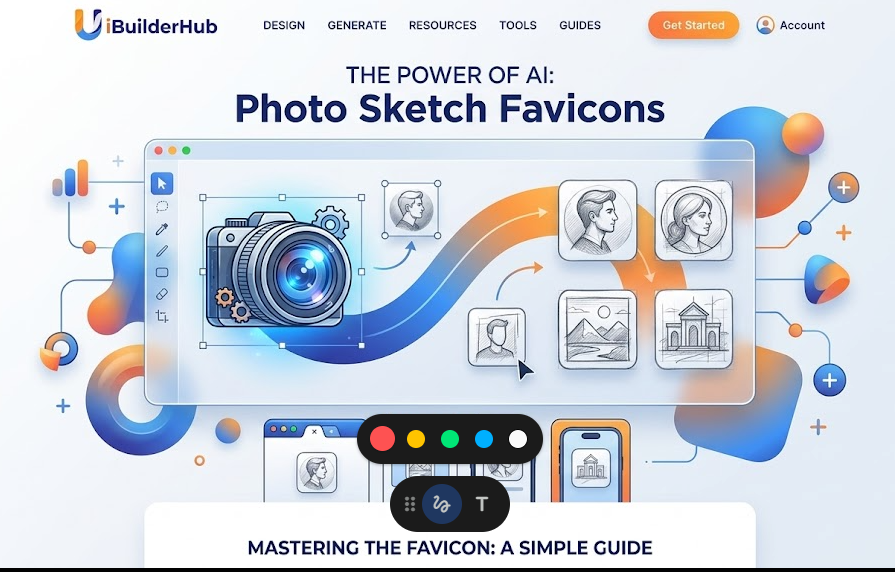
Photo to Sketch Generator: Turn Images into Art Easily
The Photo to Sketch Generator by uibuilderhub is a free, AI-powered online tool that turns any photo into a clean pencil sketch in seconds. No software, no design skills, and no cost — just upload your image and download your artwork instantly.
Introduction
Struggling to turn your photos into creative artwork without using complex design software? A photo to sketch generator can solve this problem in seconds. Whether you're a beginner or a designer, converting images into sketches manually can take hours — but with AI tools, it's now instant.
The photo to sketch generator on uibuilderhub.com helps you transform any photo into a beautiful pencil sketch with just a few clicks. No design skills needed, no software download required. Just upload, adjust, and generate.
As part of uibuilderhub's 30+ free UI/UX tools, this tool is designed to make creative work simple and fast for everyone.
👉 Try it now: https://uibuilderhub.com/tools/photo-to-sketch
What is Photo to Sketch Generator?
A photo to sketch generator is an online tool that converts your images into pencil sketches using AI technology. It analyzes your photo and automatically applies a realistic sketch effect — no manual effort required.
Key Features:
-
✅ Convert any photo to sketch instantly
-
✅ No file size or quality restrictions
-
✅ Drag and drop upload support
-
✅ AI-powered sketch generation
-
✅ Edit original image before converting
-
✅ Download high-quality sketch — watermark free
Unlike tools like Canva or Photoshop, this free online photo sketch generator is completely simple and fast. You don't need design experience or a paid subscription to get professional results.
It also works as a:
-
Photo to sketch AI tool
-
Image to sketch converter realistic
-
Photo editor sketch effect free online
Why Choose Photo to Sketch Generator for Your Projects?
There are many tools available, but this one stands out because it is fast, free, and beginner-friendly.
1. Easy to Use
No learning curve at all. Even someone using it for the first time can create a beautiful sketch within seconds.
2. Saves Time
Manual sketching can take hours of effort. This tool does the same job instantly using AI.
3. Completely Free
Unlike premium design tools, this photo to sketch maker online free costs absolutely nothing — no hidden charges, no subscriptions.
4. No Limitations
Upload any image regardless of file size or resolution. There are zero restrictions on quality.
5. Perfect for Multiple Uses
From social media content to personal gifts and design projects, this tool fits every creative need.
💡 Example: A content creator can quickly convert a photo into a sketch for an Instagram post without hiring a designer or spending money on software.
Real-World Use Cases
🎨 Artists & Creatives : Artists can use this tool to generate pencil sketch references from real photos without drawing from scratch. It is a great starting point for creating line art, building a portfolio, or experimenting with different visual styles.
📚 Students & Educators : Students can convert photos into sketch-style visuals for presentations, assignments, or art projects. Teachers can use it to make classroom content more visually interesting without needing any design background.
💼 Business & Marketing : Professionals Marketers can add a creative, hand-drawn feel to social media posts, brand campaigns, or website banners. Sketch-style visuals make content feel more personal and help brands stand out in crowded feeds.
🎁 Personal & Gifting : Anyone can turn a cherished photo into a pencil sketch portrait as a meaningful, personalized gift. It works beautifully for birthdays, weddings, anniversaries, or even creating a custom sketch of a beloved pet.
✍️ Content Creators & Designers: Content creators can use sketch visuals to bring variety and creativity to blog posts, video thumbnails, or design mockups. It is the fastest way to produce unique, eye-catching artwork without hiring an illustrator.
🚀 Why Use This Tool? No design skills needed. No software to install. Just upload your photo, generate your sketch, and download it in seconds — completely free and watermark-free.
Photo to Sketch Generator vs. Alternatives
|
Feature |
Photo to Sketch Generator |
Canva |
Photoshop |
|
Price |
Free |
Freemium |
Paid |
|
Ease of Use |
Very Easy |
Easy |
Complex |
|
AI Sketch |
Yes |
Limited |
Manual |
|
Installation |
No |
No |
Yes |
|
Watermark |
No |
Yes (Free Plan) |
No |
|
Speed |
Fast |
Medium |
Slow |
👉 For beginners and free users, this tool is clearly the most practical and accessible option available.
Frequently Asked Questions
1 Is the Photo to Sketch Generator completely free to use?
Yes, it is 100% free with no hidden charges, no subscription required, and no usage limits. You can generate and download as many sketches as you need at no cost.
2 Do I need to install any software or create an account?
No installation and no sign-up is required. The tool works entirely in your browser, so you can start converting photos to sketches immediately from any device.
3 Is there a file size or image quality limit?
There are no file size restrictions and no quality limitations. You can upload high-resolution photos and the tool will process them exactly as they are without any compression or quality loss.
4 Will my downloaded sketch have a watermark on it?
No. Every sketch you generate and download is completely watermark-free and ready to use for personal, creative, or professional purposes without any restrictions.
5 Can I edit or redo the sketch if I am not happy with the result?
Absolutely. You can click "Clear Canvas" to reset and start fresh, or go back to your original image, reposition it, and regenerate a new sketch until you are fully satisfied.
6 Is my photo safe when I use this tool?
Yes, completely. The tool processes your image directly in your browser, meaning your photos are never uploaded to or stored on any external server. Your privacy is fully protected at all times.
7 Does the tool work on mobile phones and tablets?
Yes. The Photo to Sketch Generator works smoothly on all modern browsers across desktop, tablet, and mobile devices — whether you are on Windows, macOS, Android, or iOS.
8 What image formats does the tool support?
The tool supports all major image formats including JPG, JPEG, PNG, and WEBP, making it compatible with photos from any smartphone, camera, or online source.
Conclusion
The photo to sketch generator is a powerful yet simple tool that helps you turn any photo into beautiful artistic sketches within seconds. It is fast, completely free, and perfect for beginners and professionals alike.
Whether you are a content creator, student, designer, or just someone who wants to create something unique from a personal photo — this tool makes it effortless.
👉 Head over to uibuilderhub.com and try the Photo to Sketch Generator for free today! Explore 30+ free creative tools built to boost your productivity and creativity.
💡 Also check: 👉 https://uibuilderhub.com/tools/image-compressor — Compress your images before uploading for even faster processing.
📢 Found this helpful? Share it with your friends and fellow creators!
Comments (0)
Please sign in to leave a comment.